2022 Release Recap
What's New in 2022
January
- Distro routing vacation handling
- CSS customizations to personal booking links
- HTML support in meeting types
- Product name refresh to reflect our product names! Hot & Spicy to Instant Booker & Handoff
- IB3 Launch!
- Buffers visible
- Better UI
- Updated colors to increase visibility
- Show meeting buffer toggle on the user’s side
- Updated host booking limit UX
- Updated suggested times UX to mimic new IB 3.0 functionality for booking a meeting (what I meant by instant booker regular in the vid)
February
- Everyone moved to IB3 and IB2 was deprecated
- Launch of the concierge license type! Move to make licensing easier to understand and setup
.avif)
- Hide inactive SFDC users from the user table
- Messaging on when removing users from specific workspaces - new license re-org to get us ready for new products
- Today filter in the dashboard
March
- Option to add multiple meeting locations and add additional guests launched in the meeting types!
.avif)
- New salesforce custom field of the Workspace name
April
- User table export improvements with the license type
- Distro delay accounts for data enrichment tools taking into account new information that is added to record during the delay timeframe
- Dashboard meeting actions - cancel a meeting, reassign the meeting
- Added Assignee Name + Avatar to queue Booking Links when CP knows who you are booking with
- Improved suggested times formatting in outlook
- Booking flow translations - updated translations for 3 areas of the booking flow to ensure global accessibility
- Okta login flow
- Improved Instant Booker Accessibility and added Keyboard Shortcuts to actions
May
- Hackathon to get through our backlog of improvements (91 tickets completed in the week)
- Save buttons in queues
.avif)
- Clearer distro error messaging
.avif)
- Not triggered status type in distro logs
- Remove the PII from the confirmation screen on Booking Flow
.avif)
- Faster loading on the confirmation screen
June
- Launched new feature request tool - Uservoice
- “Master Admin” ➡️ “Super Admin”
- HubSpot - Assignee vs Booker toggle -- HubSpot CRM admins can choose whether they want the Booker (default) or the Assignee to be written to the “Scheduled by” user on Engagements created by Chili Piper. This can be configured at the Workspace level under Workspace Settings > CRM Actions > Engagements
.avif)
- Added on hover state in Instant Booker for users of Chili Piper to show if their calendar is connected
.avif)
July
- Distro listed in the SFDC app exchange
- Improvements to our implementation with Distro Streaming API to reduce a number of unnecessary "events" received from Salesforce
- We have migrated our HubSpot integration from v1 to their v3 API. This will enable us to use more robust features of the HubSpot API
- HubSpot "Outcome" Engagement Property -- Chili Piper can now update the "Outcome" property on Engagements in HubSpot! When a meeting is marked as a "no-show", canceled, or rescheduled, we will update the Engagement accordingly. Support doc to come soon!
- Booking Flow Accessibility Improvements -- Chili Piper's core booking flow is now more supportive for keyboard and screen reader prospects. It's now easier than ever to tab through and select dates and times.
August
- G2 integration launch
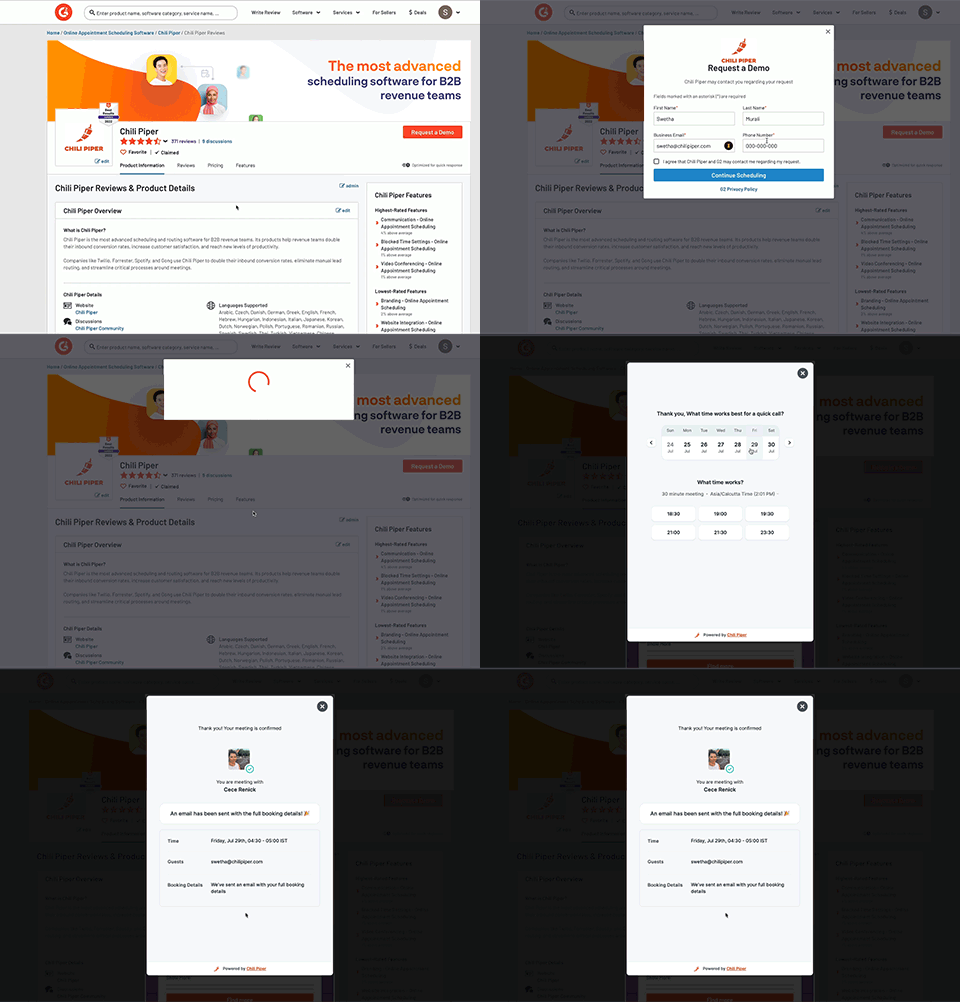
- Distro license rollout
- Email Notifications to admins when Distro failed to route
- Gong integration with recording consent pages - customers can connect to gong as their video conferencing tool
.avif)
- HubSpot API performance improvements
- Distro publication behavior that shows you any errors before you can publish
- HubSpot "Meeting Type" Engagement Property - Chili Piper can now write to the “Meeting Type” property on Engagements created by CP in HubSpot! The name of the associated Meeting Type in CP will now appear on newly created Engagements in HubSpot. This allows HubSpot Admins to be able to report onthe type of meeting being booked
.avif)
September
- Zapier payload now includes "timezone": Our Zapier payload for new and rescheduled meetings now includes the timezone (i.e. "America/Los Angeles") of the meeting. This makes it easier for customers using this integration to create automation specific to the Guest’s timezone.
- List as an official Zapier partner
- Added Gong location option to Instant Booker
- Maintain Filters in Distro Logs -- When filtering records in Distro Logs, we will now maintain the filters throughout the user's session in distro logs.
- List CRM Routers in the order in of creation -- This will happen in both the router table and distro logs - so that the table behavior is consistent.
- Increase visibility in Distro Logs -- Expand distro logs details by default so that it is easier for admins to see what matched. We also added 'see details' to the summary block which will drive them to the details section of the page.
- Upgraded dynamic tag experience - you can now drag and drop and ex out of them with ease
October
- SAML SSO login within Rippling
- Warning message when a rule is removed - We've added a warning message when you remove a queue rule. The message is to remind admins that they need to ensure their queue logic matches their rules. This is to help reduce support tickets caused when rule logic breaks routing
- New User table launch
- Bulk updates!
- Column Sorting
- Additional columns in CSV Export
- Cleaner UI
- More data in the user table export
- Admins who download a CSV of the User Table will now see additional columns: CP User Id, Extension Status, CRM Status, Calendar Status, Zoom Status, Webex Status, GoToMeeting Status, RingCentral Status, Gong Status, Phone Status
.avif)
- Make 'Router Status' the second column in distro logs, so that its easier to see the status of each router
November
- (User Table) Workspaces Bulk Updates - Super Admins can now add and remove users from Workspace(s) in bulk from the Admin Center > User Table
.avif)
- User table speed improvements.
December
- 🚀 User Table - multi-select performance improvements – Selecting multiple users (100+) with the "Select All" button was slow or could overwhelm the back-end and cause the page to freeze. We’ve fixed that so the select all checkbox on the User Table is snappy.
- New personal page UI