// Salesforce lead routing
Salesforce lead routing without the 30-node flowchart
Route any Salesforce object, standard or custom, with lead-to-account matching, weighted round-robin, SLAs that reassign, and an audit log for every decision. Set up in about an hour, change it in minutes.
The secret sauce behind high-performing GTM teams at
// Why it matters
Routing is where speed-to-lead goes to die in Salesforce
Native assignment rules were built for a simpler funnel. Once you add territories, named accounts, product lines, and round-robin fairness, teams end up with layered workflows a single admin understands, and every lead waits on the plumbing. Chili Piper's Distro replaces that with rules you can read, test, and change the same day.
What is Salesforce lead routing?
Salesforce lead routing is the process of assigning incoming leads, from forms, lists, events, or record updates, to the right owner in your CRM: the rep who covers the territory, the account executive who already owns the account, or the next rep in a fair rotation. Done well, it's invisible: a lead is created and seconds later the right person owns it, with the assignment logged.
Done badly, it's where pipeline quietly leaks. PandaDoc processes 20,000–30,000 trials a month; before automating, routing at that volume meant spreadsheets and multi-day response times. After rebuilding on Chili Piper, their speed to lead is under 5 minutes, because assignment happens the moment the record exists, not when someone gets to the queue.
Why native assignment rules stop scaling
Salesforce's built-in lead assignment rules evaluate top-down and stop at the first match, workable for simple geographies, brittle for real go-to-market motions. Ownership checks, de-duplication, weighted round-robin, and SLA escalation each require extra workflows, flows, or Apex, layered by whoever was the admin at the time.
The cost shows up as change latency. At SwagUp, every routing change was a developer ticket with up to a 72-hour turnaround; now non-developers edit the rules themselves in about 2 minutes. At N-able, marketing operations spent 2 to 2.5 hours routing manually before cutting it 98%. Monograph replaced a 30-node LeanData flow, where roughly half of leads were ever actioned, with one entry rule and three routing rules, and auto-routed 687 leads the next month.
What good Salesforce routing looks like
Ownership first: lead-to-account matching should check whether the account already has an owner before anything enters a rotation, so a known customer never lands with a stranger. Fairness that maintains itself: weighted round-robin with credits and skips for no-shows and cancellations, and vacation handling that reads rep calendars instead of waiting for someone to pause a queue.
Accountability last: SLAs that automatically reassign a lead when it goes unworked, and an audit log that traces every decision, which rule matched, which account it matched to, who it landed on. That's the difference between routing you trust and routing you investigate.
// How it works
How Salesforce lead routing works
Connect Salesforce
The managed package installs custom fields and a pre-filtered dashboard. Chili Piper operates via API only with OAuth 2.0, and a Sandbox staging instance keeps experiments away from production.
Build rules you can read
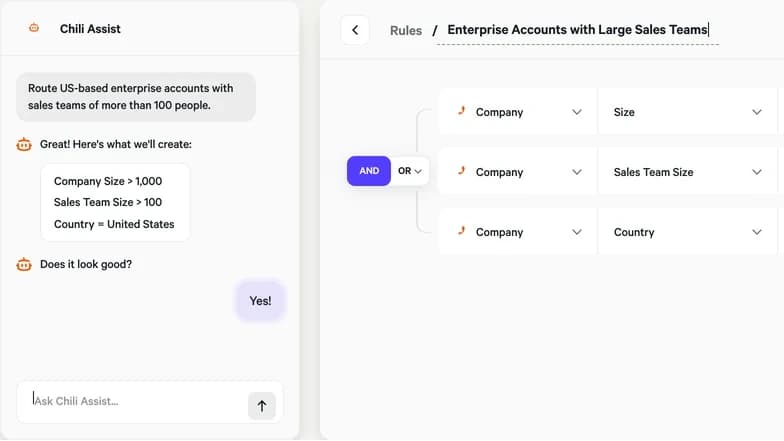
A guided, guarded builder only offers options that won't break the router. Route on any standard or custom object with AND/OR logic, then preview against real Salesforce records before publishing.
Let it enforce itself
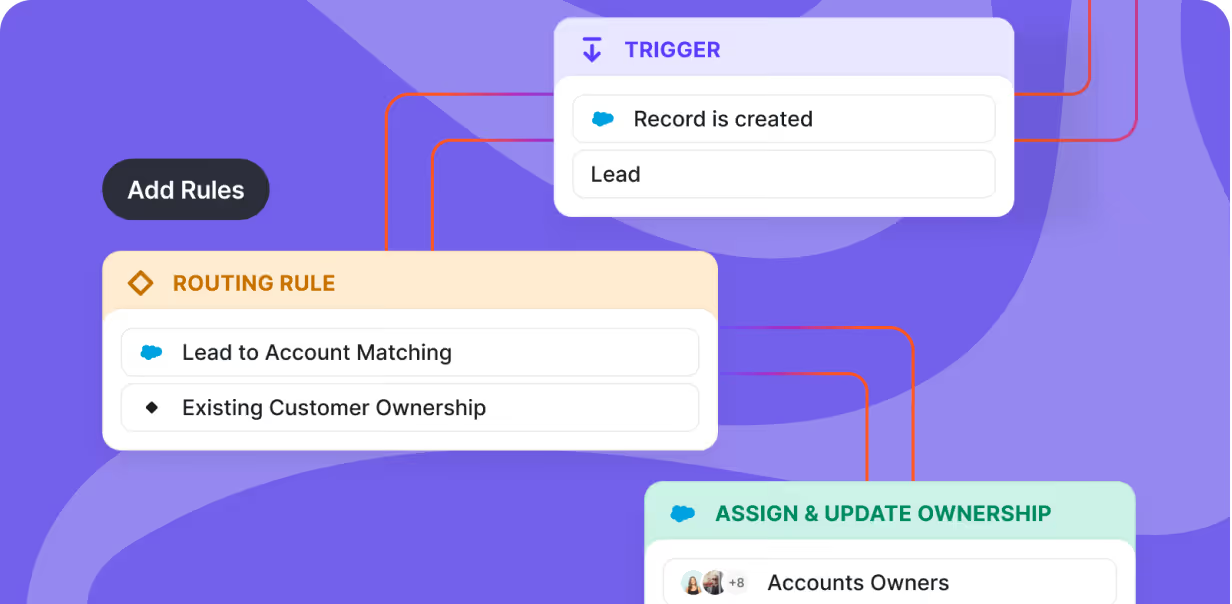
Lead-to-account matching assigns owners first, weighted round-robin distributes the rest, SLAs reassign unworked leads, and the audit log records every step.
// What you get
What's included
01
Route any Salesforce object
Leads, Contacts, Accounts, Opportunities, Cases, or any custom object, with granular AND/OR conditions, triggered on new records, updates, or both.
02
Lead-to-account matching
Leads are matched to existing accounts and assigned to the account owner before distribution, with automatic duplicate matching and merging on the way in.
03
Round-robin that stays fair
Weighting and calibration rules balance the queue, and vacation management reads reps' calendars to remove them while they're out, no manual pausing.
04
SLAs that reassign
Set follow-up windows with rep reminders. If the SLA isn't met, the lead reassigns to another rep instead of aging in a queue nobody watches.
05
Preview mode and audit log
Test routers against real Salesforce records before pushing live, then follow any record's full journey through the rules after the fact.
06
Lead score redistribution
When an existing prospect shows high intent, Distro updates the record and re-routes it per your rules, so hot accounts resurface instead of staying parked.
// The stack
The products doing the work


The hottest GTM teams run on Chili Piper
Your logo belongs here



“70% lift in demo request form conversions. 5x increase in the number of demo requests. Frictionless buyer experience.”

Noa Farber
Director of Marketing AutomationGong









Common questions
How do I automate lead routing in Salesforce?
Connect Chili Piper's managed package, build routing rules in the guided builder (territory, ownership, company size, or any standard/custom field), and publish. Distro then assigns records automatically as they're created or updated, most teams set it up in about an hour.
Can Salesforce do round-robin lead assignment natively?
Not well. Native assignment rules stop at the first match and have no concept of fairness, weighting, or calibration. Distro adds weighted round-robin with credits and skips for no-shows and cancellations, plus vacation handling that reads rep calendars automatically.
How do I route leads to the account owner?
Lead-to-account matching checks incoming leads against existing accounts first and assigns the account owner directly. Only unowned leads enter the round-robin, so a known customer never gets treated like a stranger.
Which Salesforce objects can be routed?
Any standard or custom object, Leads, Contacts, Accounts, Opportunities, Cases, and custom objects, with conditions on any field, including lookups and cross-object references. Triggers fire on new records, updates, or both.
What does a Salesforce lead routing rule actually look like?
A rule is a plain-language condition plus an owner: for example, "Country = United States AND Company Size > 500 → assign to the Enterprise round-robin," or "Existing Account Owner exists → assign to that owner, skip the queue." The guided builder shows AND/OR conditions on any field and previews which real records they'd match before you publish, so there's no flowchart to read to understand what a rule does.
How is this different from LeanData?
Simplicity and speed of change. Monograph replaced a 30-node LeanData flow with one entry rule plus three routing rules, and routing is shared with the rest of Chili Piper, so the same logic powers forms, chat, and handoffs.
What happens when a rep doesn't work a lead?
SLAs with reminders escalate automatically: if the follow-up window passes, the lead reassigns to another rep. Reachdesk paired routing with SLAs and saw a 35% higher win rate on inbound, with 2,000+ meetings booked in a half-year.
Can I test routing changes before they go live?
Yes. Preview mode runs a router against real Salesforce records without publishing, and drafts stay unpublished until approved, so a territory change is a controlled edit, not a production experiment.
Is it safe to connect to our Salesforce org?
Chili Piper operates via API only using OAuth 2.0, no code installed in your org beyond the managed package's custom fields and dashboard. A Salesforce Sandbox staging instance is available, and Chili Piper is SOC 2 Type 2 and ISO 27001 compliant.
Why are my Salesforce lead assignment rules not working?
The usual causes: only one lead assignment rule can be active at a time, rules evaluate top-down and stop at the first match, and records created by API or import skip assignment unless the "assign using active assignment rules" flag is set. Debugging means reading the whole rule stack. Distro sidesteps this with readable rules, preview mode against real records, and an audit log showing exactly which rule matched and why.
What is the order of execution for Salesforce assignment rules?
In Salesforce, assignment rules run after triggers and workflow field updates but before most flows send notifications — and rule entries evaluate strictly top-down, stopping at the first match. That ordering is why layered routing logic breaks in surprising ways. Chili Piper evaluates routing as one readable rule set with a logged decision per record, so you see the order of execution instead of inferring it.