The Ultimate Lead Routing Guide and Tech Stack
by Candybox
What Is Lead Routing (and Why It Breaks So Often)
Lead routing represents the fundamental process of delivering inbound leads to appropriate sales representatives with minimal delay. While conceptually straightforward, this function constitutes one of GTM system's most significant failure points.
Routing occupies a critical position between marketing intent and sales execution. Successful routing operates invisibly, yet failures manifest visibly: abandoned follow-ups, inequitable distribution patterns, redundant outreach, and lost hours tracking lead destinations.
Candybox identifies three consistent root causes across SaaS organizations of varying sizes: insufficient speed to lead, fairness deterioration, and conversion reduction when logic or data lack alignment.
Common Misconception: "Our organization possesses a routing tool, so our processes function adequately."
Routing platforms like Chili Piper deliver value, though they cannot independently resolve fundamentally flawed logic. When data structures lack clarity or systems disagree on data interpretation, even optimal routers cannot provide solutions.
Routing demands continuous attention rather than one-time configuration. Success requires clear logic, precise data, and regular maintenance.
The Three Systems That Make (or Break) Routing
Most routing complications originate beyond the router itself, within surrounding system interactions. Breakdowns typically occur between Salesforce, HubSpot, and Chili Piper.
1. Salesforce – The System of Record
Salesforce functions as the authoritative source for ownership, segmentation, and territory assignment. Poor data quality or logic stored externally in spreadsheets creates fragile, unauditable routing.
2. HubSpot – The Marketing Engine
HubSpot captures intent signals including form submissions, campaign activity, and advertisement responses. Its function centers on transmitting clean, structured data to Salesforce for routing activation, not lead assignment.
3. Chili Piper – The Orchestration Layer
Chili Piper connects routing decisions to executable actions, ensuring appropriate representatives receive leads instantly within correct time zones with scheduling capabilities activated.
Salesforce determines routing recipients; Chili Piper manages execution methodology and timing.
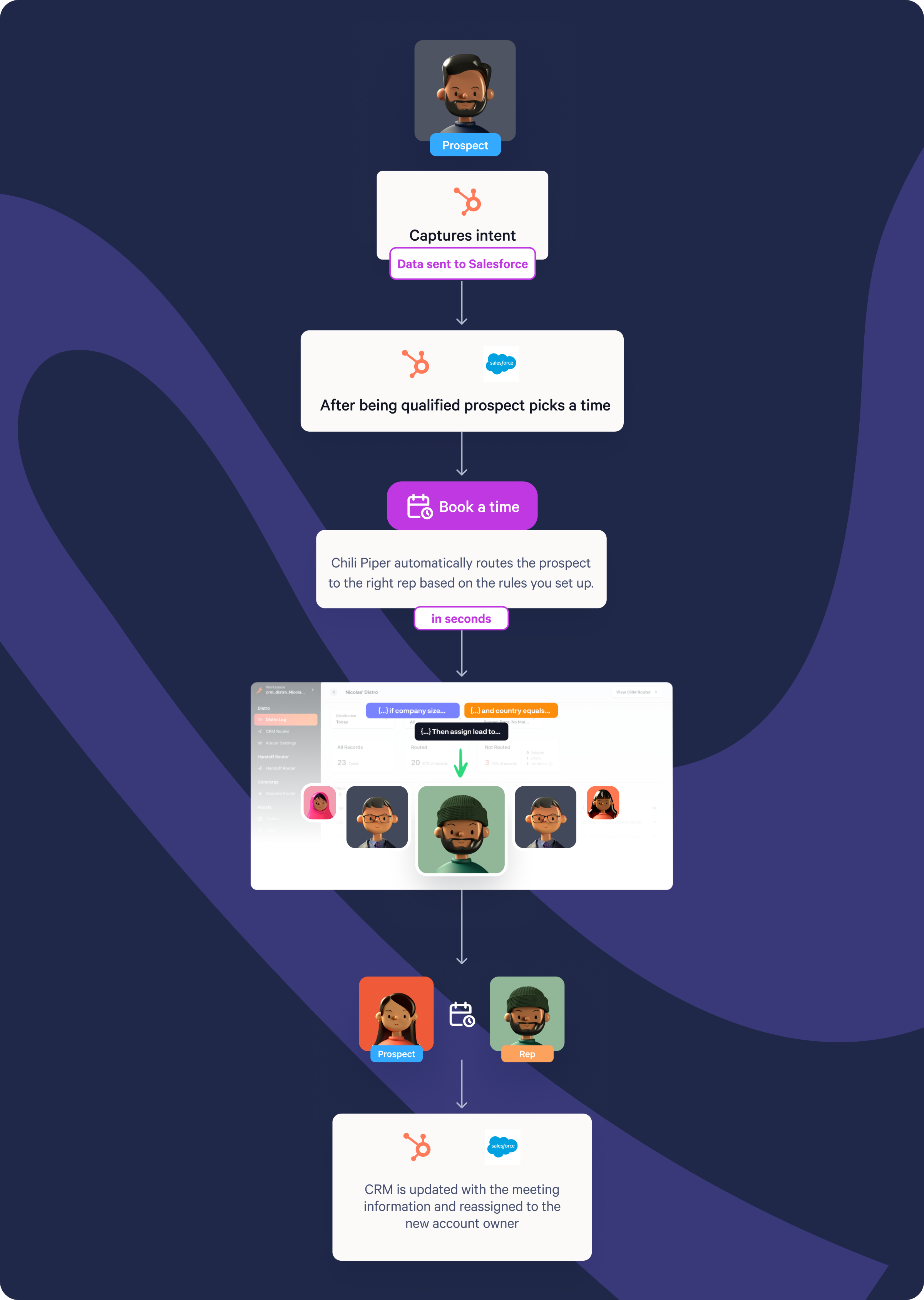
"Most organizations already possess necessary tools — they simply lack understanding regarding how each system processes data differently." — Mark Spellman, Candybox Head of Delivery
The Most Common Lead Routing Mistakes (and How to Avoid Them)
Despite adequate tools and positive intentions, numerous SaaS organizations overcomplicate routing. Rules accumulate until processes become incomprehensible, and organizational memory deteriorates when originators depart.
After reconstructing routing systems across dozens of organizations, five recurring mistakes emerge consistently.
1. Over-Engineering the Logic
Organizations hard-code field-level rules without recognizing differential system data handling. "You might expect numeric values while ad platforms transmit ranges," Mark explains. "Logic mismatches cause leads to disappear."
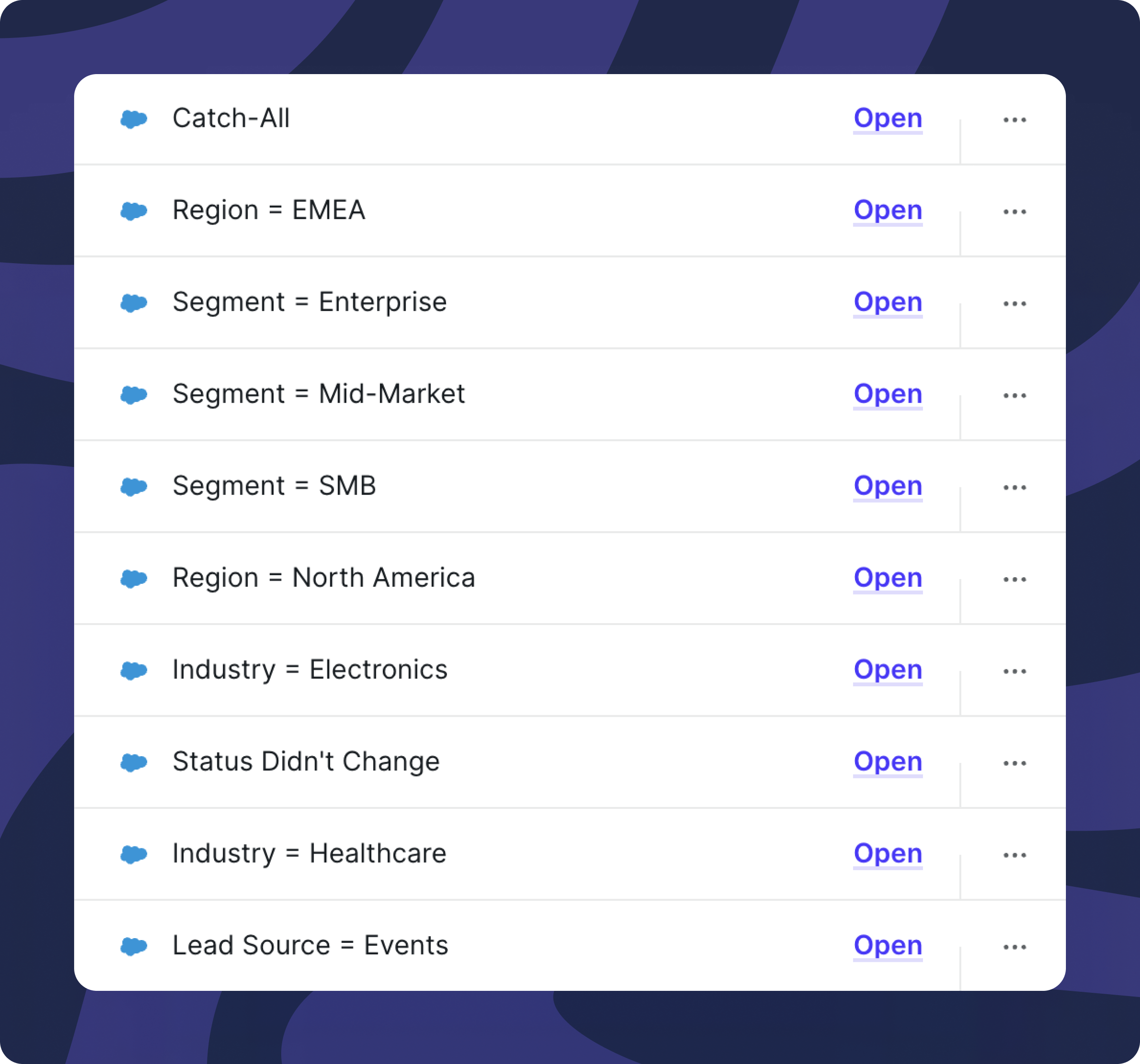
Keep criteria uncomplicated and centralized. Normalize fields in Salesforce (such as Segment = SMB/Mid-Market/Enterprise) permitting routers to read standardized values.
2. Using the Router for Anything Else
Routers should exclusively route. Using them for enrichment, scoring, or data storage generates operational chaos.
Alex, Candybox RevOps Architect, notes: "We discover routers storing variables, passing enrichment data, triggering workflows. That's not their purpose."
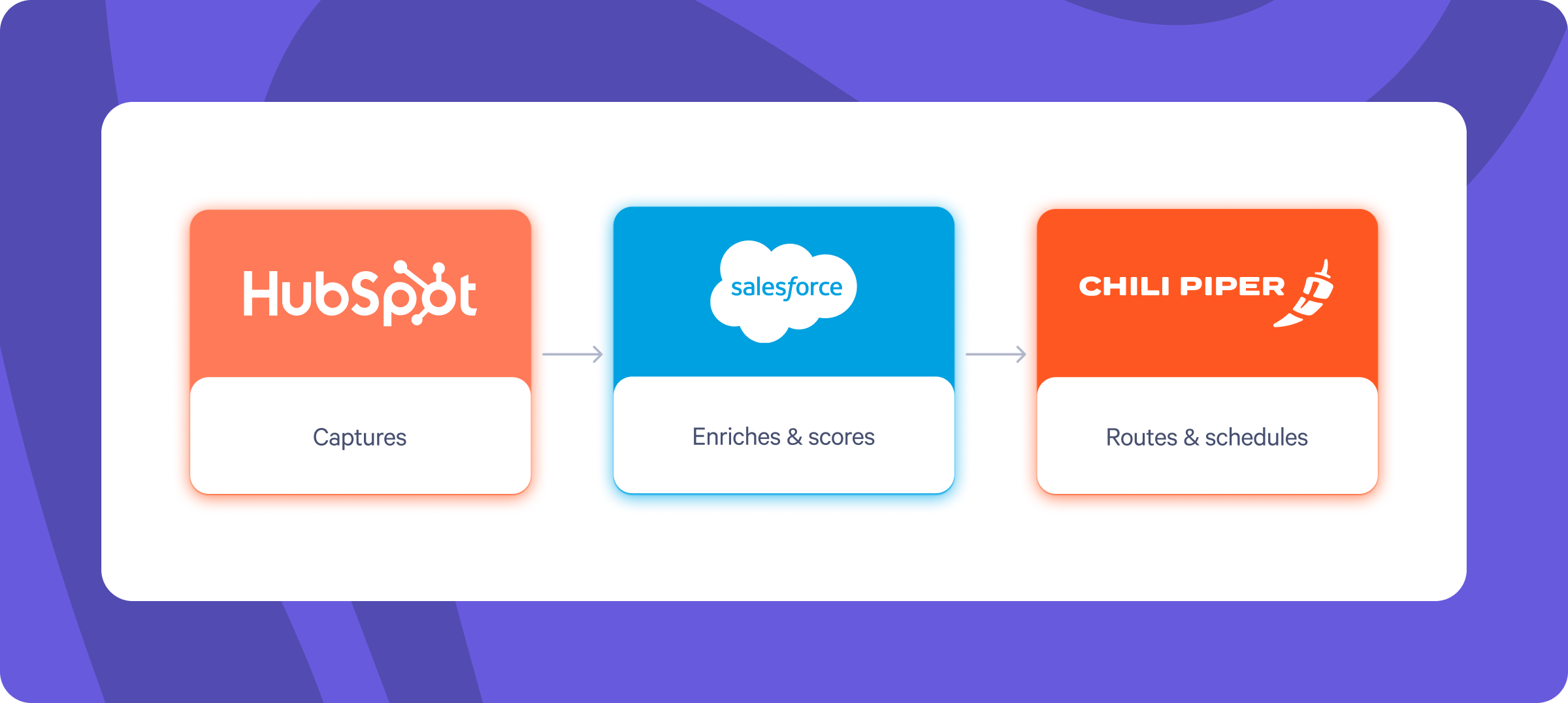
Maintain role clarity:
- HubSpot captures
- Salesforce enriches and scores
- Chili Piper routes and schedules
3. Forgetting the Fallback Rules
Optimal logic requires safety mechanisms. When data becomes incomplete or rules fail, Salesforce requires a catch-all bucket.
When routers cannot locate intended recipients, leads require designated placement within a monitored queue.
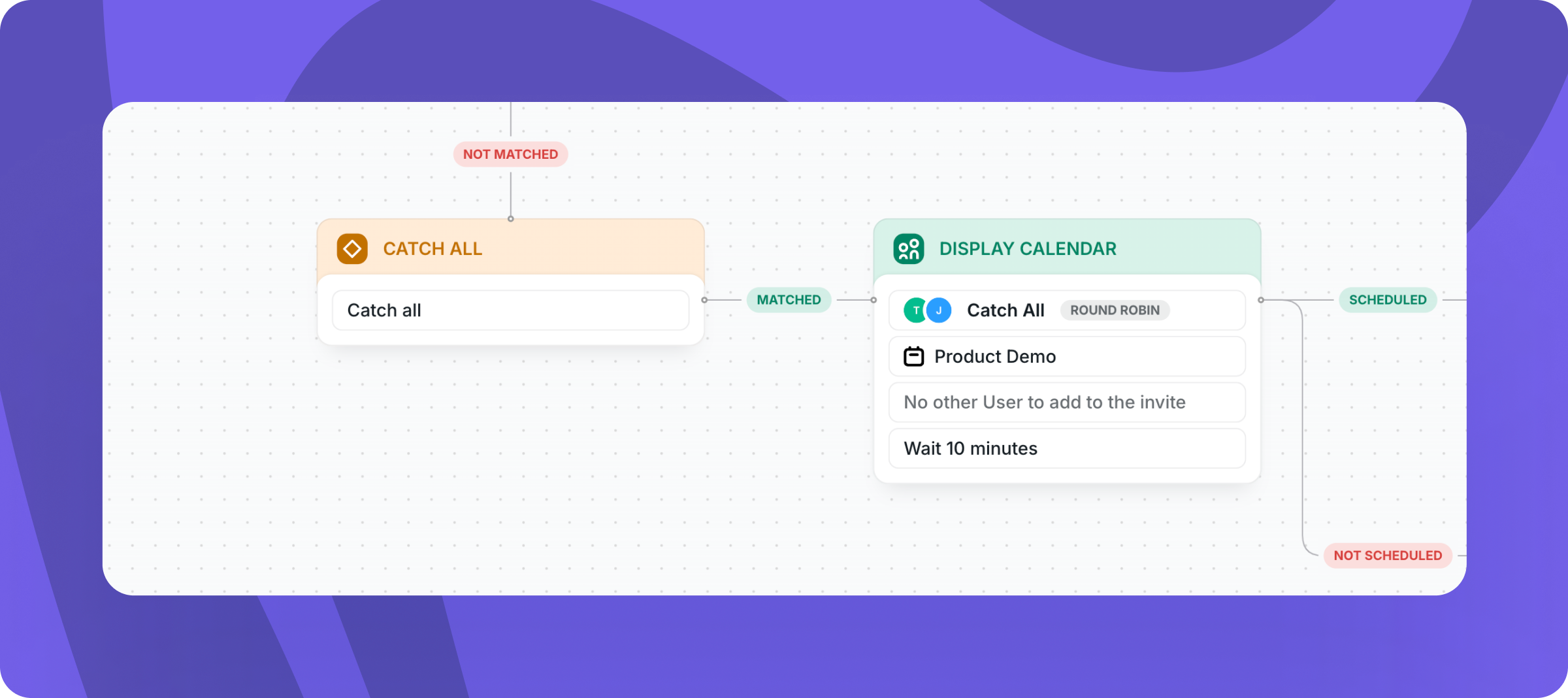
Absent fallbacks create lost pipeline.
4. Ignoring Data Quality
Routing effectiveness equals data quality. Inconsistent enrichment or unsynchronized fields undermine routing decisions.
"Similar to AI: substandard input produces substandard output," Chase, Candybox RevOps & GTM Systems Consultant, observes.
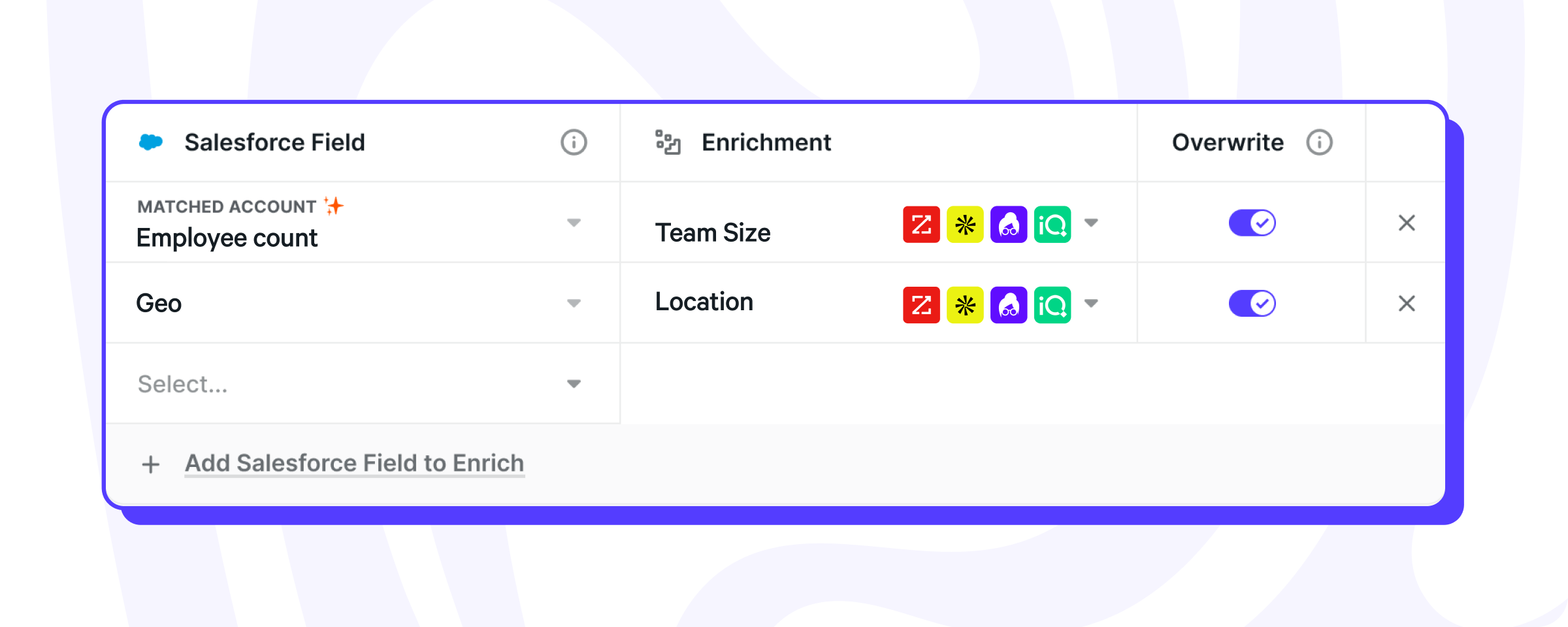
Regularly audit data models. Maintain core routing fields (geography, segment, employee count, ownership) documented, consistent, and real-time synchronized.
5. Losing Sight of Fairness and Transparency
Routing combines automation with trust mechanisms. Representatives questioning fairness reduce adoption, escalate complaints, and create unofficial processes.
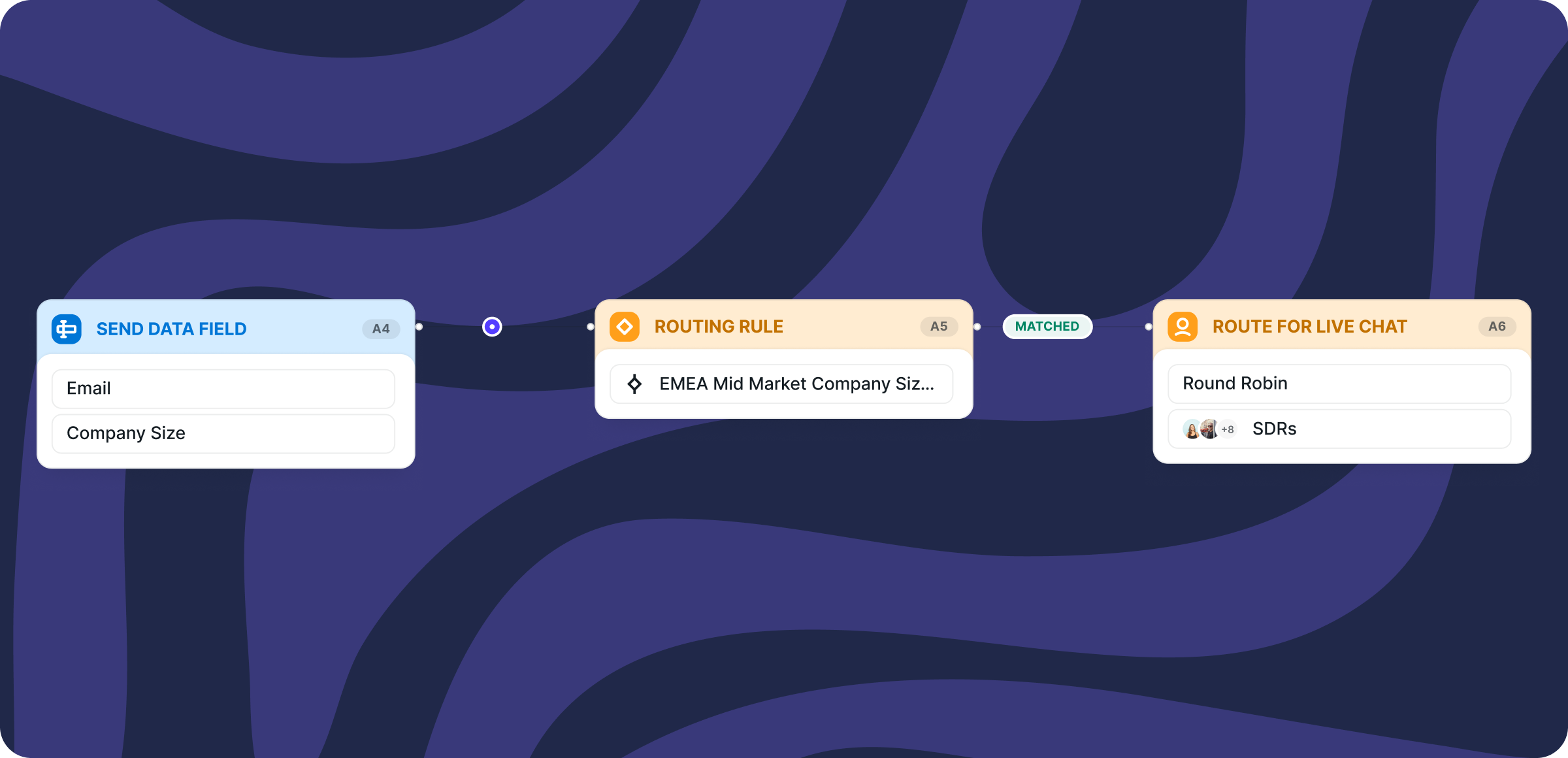
Chili Piper provides auditability for round-robin and group logic. Visibility regarding assignment sequence and rationale strengthens representative confidence.
Candybox Guidance: When representatives ask, "Why did this route elsewhere?", routing logic requires enhanced transparency.
In summary: overcomplication, misuse, missing guardrails, compromised data, and absent transparency represent five patterns addressed during lead routing reconstruction. Success demands simplicity, visibility, and auditability for scalable routing.
Lead Routing Strategies That Actually Scale
No universal optimal routing methodology exists. Appropriate configuration depends on volume, team dimensions, and go-to-market motion specifics.
After repairing hundreds of compromised routing systems, one principle endures: simpler logic persists longer.
Three consistently effective strategies span early-stage through scaled GTM organizations operating across multiple time zones.
1. Round Robin: Simple, Fair, and Proven to Work
Round robin routing provides healthy sales team foundations. It operates quickly, fairly, and remains maintainable, particularly for teams prioritizing sales representative utilization and rapid response.
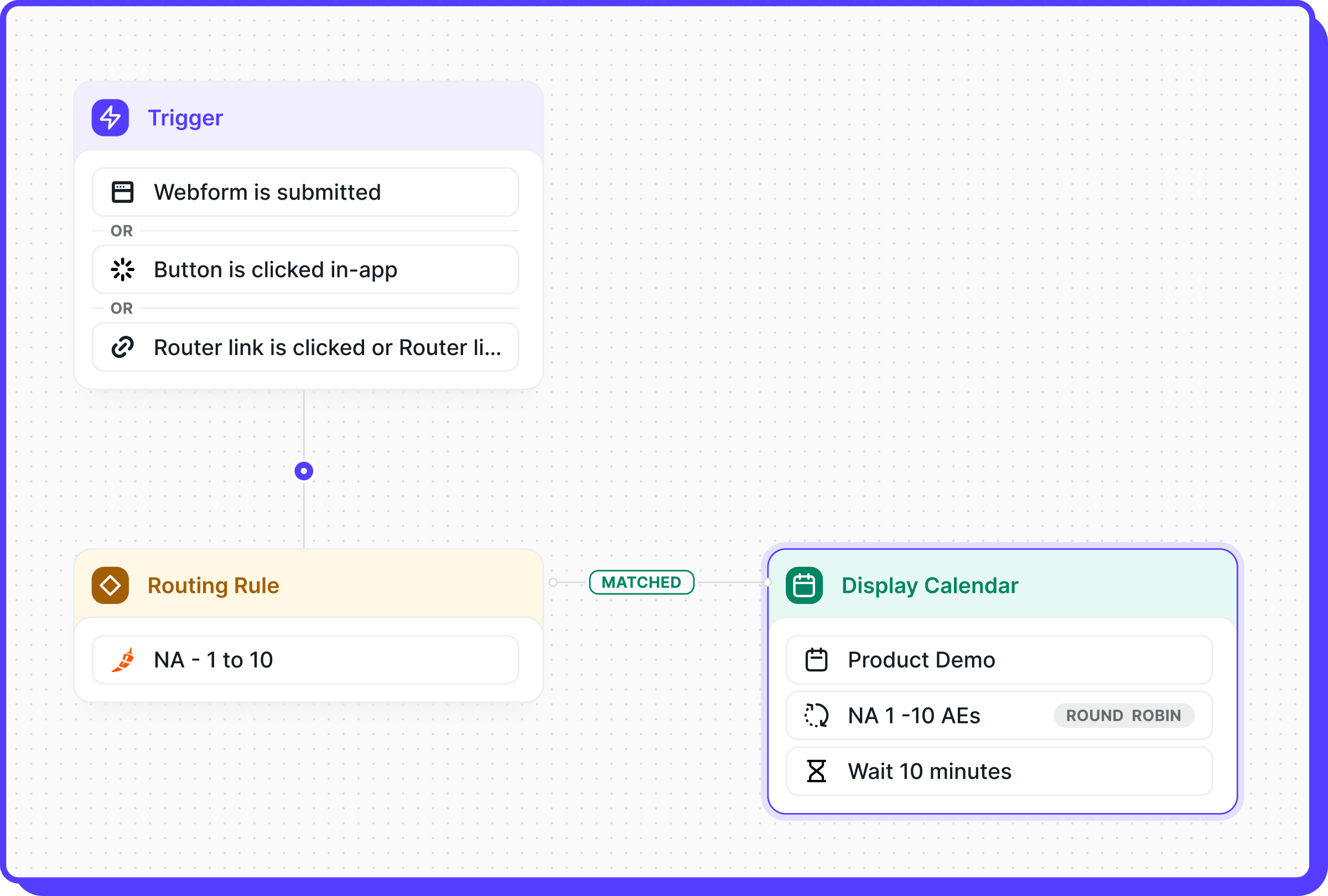
Alex states: "Segmentation sophistication remains possible, but round robin forms the foundation. Everyone receives equitable opportunities, eliminating exclusion feelings."
Clean round robin implementation includes these elements:
- Leads enter Salesforce through HubSpot or alternate forms
- Routers examine fields including geography or organization size
- Leads assign to the next available representative within segment queues
Simple layered criteria examples:
- East Coast → Round Robin Group A
- West Coast → Round Robin Group B
Resist over-customization.
Key consideration: Even with ten current representatives, construct logic supporting twenty, fifty, or a hundred representatives without requiring rebuilds.
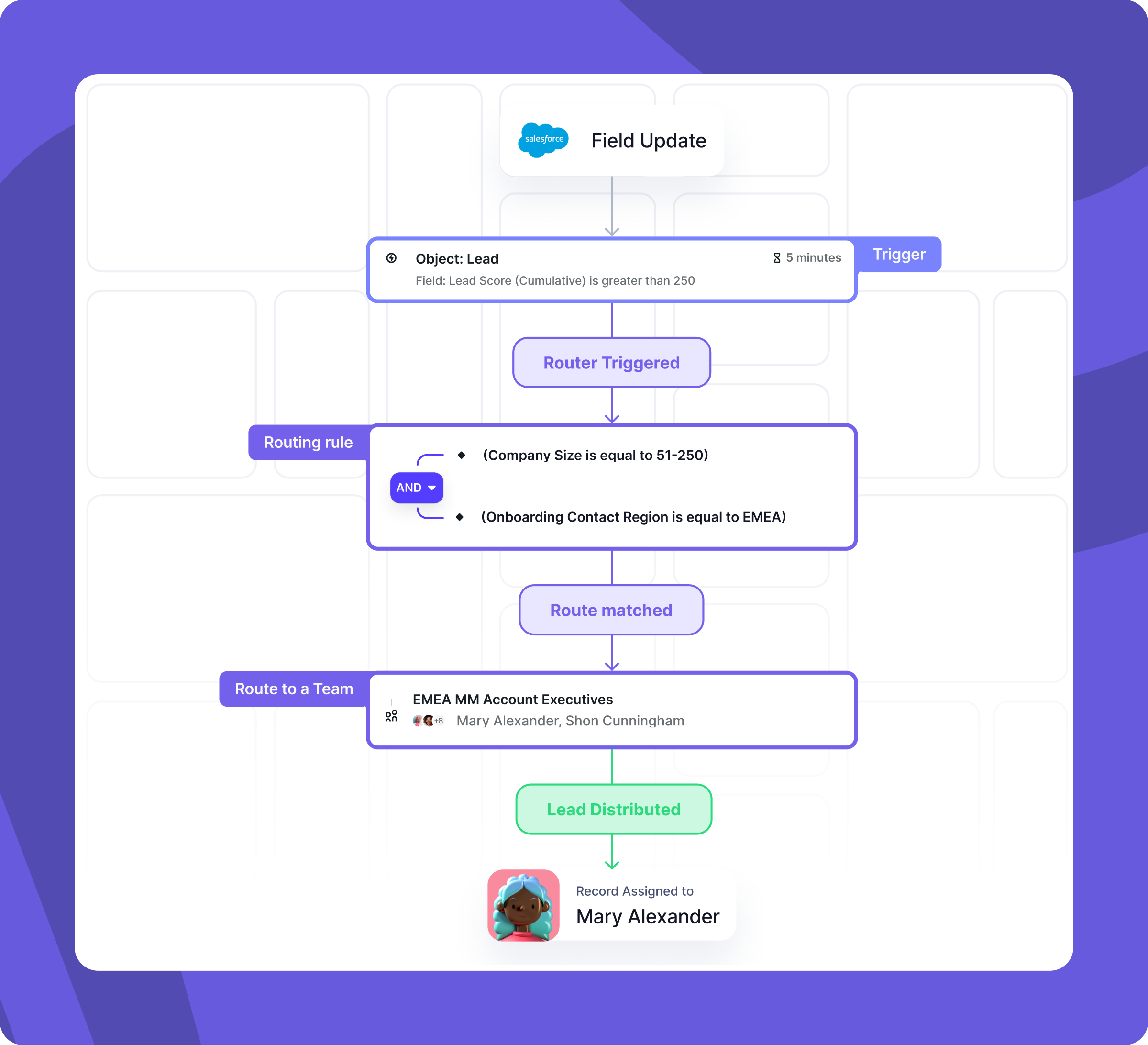
Alex shares: "In prior roles, despite having a single enterprise representative, I established enterprise round robin groups. Adding subsequent representatives required only a user ID addition rather than router reconstruction."
This mentality defines scalable routing: construct for growth, not current state.
2. Territory or Segment-Based Routing
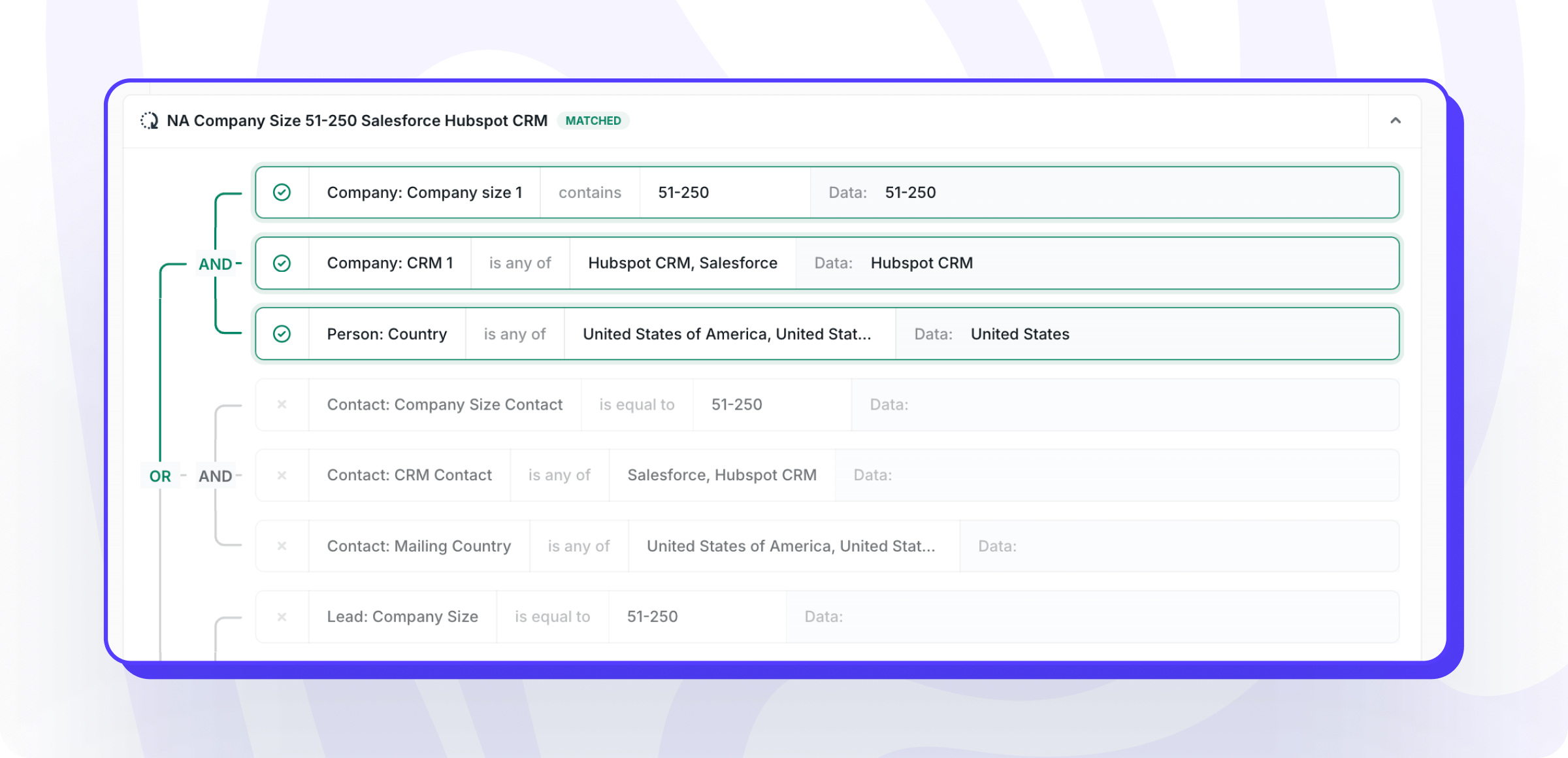
Team growth or multi-market selling necessitates round robin supplementation. Segmentation typically occurs by geography, company scale, or product categories.
Territory routing succeeds when:
- Leads contain enriched, clear data (geography, segment, product interest)
- Segments receive definition upstream in Salesforce rather than router internals
- Routers merely read segment fields, directing to appropriate groups
This maintains human-readable, auditable rules avoiding buried multi-tool logic searches during troubleshooting.
3. Manual Routing for High-Value or Low-Volume Deals
Automation doesn't universally apply. Lower volumes or significant strategic accounts benefit from manual routing over automated systems.
Chase provides enterprise client context: "They receive minimal inbound but each represents potential six-figure opportunities. Every lead receives manual review before assignment — slower, yet missing one costs more than verification time."
Manual routing applies when:
- Leads require individualized handling
- Volumes remain low enough justifying human review, eliminating poor lead sorting
- Strategic or enterprise account routing prioritizes precision over velocity
Automate high-frequency inbound; incorporate human checkpoints for high-value inbound.
Hybrid Routing: The Best of Both Worlds
Most SaaS organizations occupy the middle ground: high-volume segment automation with top-tier lead manual reviews.
Hybrid setups might include:
- Paid and organic inbound → automated Chili Piper routing to SDRs
- Event or strategic leads → manual assignment flagging for RevOps
Define when automation applies versus when intervention is required.
Routing Strategy Comparison Table:
| Strategy | Best For | Why It Works |
|---|---|---|
| Manual Routing | Early-stage teams with low lead volume | Each lead receives human review; ideal when missed opportunities cost more than speed |
| Round Robin | Growing teams establishing initial inbound motion | Fair, quick distribution without overcomplicating logic; easy setup and maintenance |
| Segment or Territory-Based Routing | Scaling orgs with defined regions or segments | Aligns leads to appropriate representatives by geography, company scale, or segment; enables specialization |
| Hybrid (Automated + Manual) | Mid-to-late stage teams balancing volume and value | Automates high-volume inbound while maintaining strategic lead manual review |
| Intent or Behavioral Routing | Advanced RevOps orgs with mature data and tech stacks | Uses fit, engagement, and buying signals for dynamic routing and prioritization |
Data Enrichment, Lead Scoring, and Handoff: When to Route
Routing timing determines routing success as significantly as recipient selection. This distinction separates clean, scalable routing from constantly misfiring systems, preserving critical speed-to-lead advantages.
Defining Your Handoff Moment
Lead routing timing debates center on the Marketing-to-Sales handoff moment. Some organizations route immediately upon HubSpot form capture. Others enrich, score, and qualify before representative contact. Approaches depend primarily on organizational maturity.
Early-stage teams routing immediately post-form works acceptably when pursuing all hand-raises. Scaling organizations require enrichment, scoring, and segment validation guardrails before routing activation.
Lead Scoring
Enrichment provides facts; scoring provides signals guiding routing readiness assessment rather than routing fit alone.
Lead scoring functions as marketing operations. Data homes where marketing information resides — ideally HubSpot or comparable marketing automation.
Scoring should incorporate:
- Fit: Firmographic data including company scale, revenue, technology stacks
- Engagement: Site frequency, content downloads, advertisement clicks
- Intent: G2, 6sense, or Chili Piper enrichment signals
MQL threshold crossings signal handoff moments when leads demonstrate both high fit and high intent simultaneously.
Timing: Speed to Lead
Speed-to-lead encompasses automation and orchestration. Chili Piper advantages include automated timing gap closure.
Alex illustrates: "Global representative distribution requires intelligent timezone-based routing determining actual availability. That distinction significantly impacts conversion."
Distributed or global teams require timezone and availability rules consideration. Logic ignoring these factors reduces conversion potential.

Optimal routing setups synchronize enrichment, scoring, and scheduling systems seamlessly. Alternative approaches merely apply automation without alignment.
Building Reliable Routing Systems: Auditing, Maintenance, and Guardrails
Excellent routing extends beyond construction — maintenance with distinct guardrails, precise data, and consistent audits proves essential.
Audit Early. Audit Often.
Unaddressed systems cannot be repaired. Before activating routers, transmit dummy data through systems and follow Salesforce trails ensuring expected destinations. Repeat quarterly.
Recommended audit scheduling:
- Daily/Automatically: Unrouted lead flagging
- Monthly: Round robin and lead distribution reviews
- Quarterly: Logic, ownership, and new segmentation field reviews
- Post-system changes: Complete end-to-end routing retesting; avoid integration survival assumptions following field renames or HubSpot form modifications
Audit goals ensure routing behaves as intended.
Turn On Tracking (and Use It)
Routing setups require documented trails. Candybox consistently recommends enabling Field History Tracking on Salesforce Lead and/or Contact objects.
Answerable questions should include:
- Lead ownership at creation?
- Reassignment process and reason?
- Which routing rule executed assignment decisions?
Setting Guardrails
Previously mentioned but critical: optimal routing logic requires safety mechanisms.
Implementation includes:
- Fallback owner (typically sales manager or RevOps administrator)
- Catch-all queue for unrouted leads
- Slack or email alert for catch-all bucket activation
Routing demands ongoing attention rather than static configuration.
Document the Logic (Even if It's Simple)
Though unglamorous, documentation prevents future complications. Every router, flow, and segment rule should reside in shared documentation, even basic Notion pages or Google Sheets.
Many routing fixes begin when participants admit, "I'm uncertain how this was constructed."
Routing existing solely in individual knowledge sets fails future teams.
Why Chili Piper + Salesforce + HubSpot = The Ideal Lead Routing Stack
Complex tool stacks don't fix routing. Clear role definition and synergistic system interaction do.
Hundreds of SaaS environments demonstrate consistent results with identical combinations: Salesforce managing data and ownership, HubSpot capturing intent, Chili Piper handling routing and conversion.
Each system excels at distinct functions without overlap, duplication, or blame assignment during failures.
HubSpot: The Front Door
HubSpot initiates lead journeys capturing intent including demo requests, ebook downloads, and paid advertisement clicks before passing information onward.
HubSpot's responsibility involves ensuring Salesforce-received data remains clean, enriched, and consistent rather than determining lead ownership.
HubSpot-to-Salesforce handoffs initiate most routing complications. Clean transitions eliminate 80% of downstream errors.
Salesforce: The Brain of the Operation
Salesforce houses routing logic optimally. It identifies ownership, account segmentation, and existing record status.
Salesforce-resident routing logic yields three critical advantages:
- Auditability — Traceable lead paths for each record
- Flexibility — GTM model evolution accommodates routing criteria adjustments
- Scalability — Representative or region additions require configuration updates rather than complete rebuilds
Candybox begins by cleaning and normalizing Salesforce data since routers reflect data intelligence.
Chili Piper: The Orchestration Layer
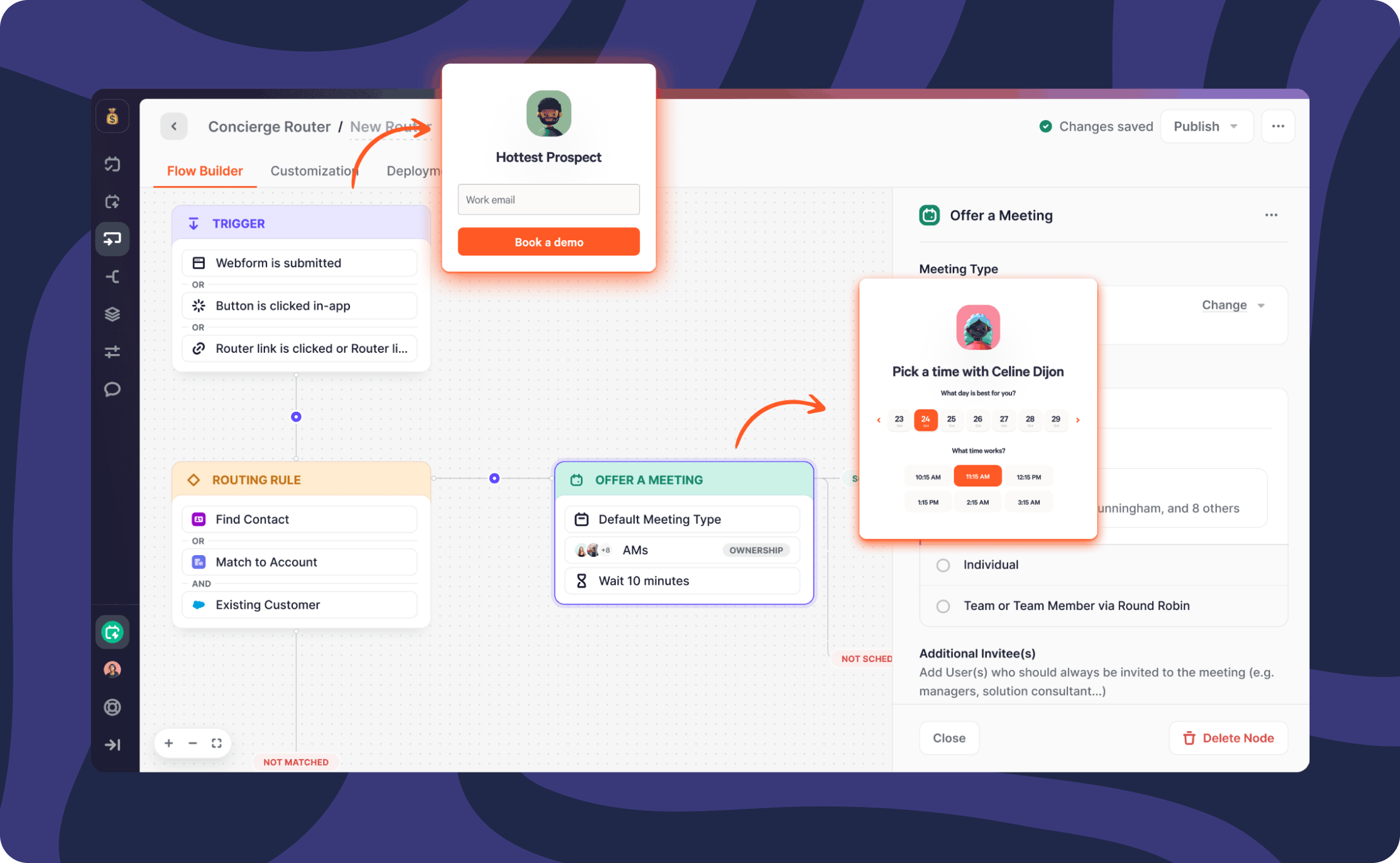
Chili Piper transforms logic into executable action. It reads Salesforce fields, applies routing rules, and books meetings simultaneously.
Notable features include:
- Auto-convert: Qualified leads transform into contacts automatically
- Dynamic group routing: Complex team structures maintain fairness without failure
- Instant scheduling: Speed-to-lead gaps that eliminate most inbound conversion disappear
This layer shifts routing from an operations function to a revenue function.
Final Thoughts: Keep It Simple, Keep It Fast, Keep It Fair
Interview participants demonstrated consensus: overcomplication destroys routing.
Most broken setups started simple, becoming brittle as layers accumulated. Predictability remains the goal:
- Every lead receives routing
- Everyone understands routing methodology and rationale
- No one questions functionality — they trust it works
Routing never reaches completion. Clean, documented, and predictable routing becomes seamless — exactly as intended.
Need a Lead Routing Audit?
Candybox assists SaaS teams fixing, simplifying, and scaling lead routing across Salesforce, HubSpot, and Chili Piper ecosystems.